
How to Install n8n: Step-by-Step Self-Hosting with Docker
Estimated reading time: 10 minutes
Key Takeaways
- n8n is a highly flexible, open-source workflow automation tool that connects 350+ apps and services.
- Self-hosting with Docker provides maximum privacy, ownership, and scalability.
- Production-ready installations benefit from a dedicated domain, SSL, and PostgreSQL.
- Docker Compose makes updates, backups, and scaling simple for both beginners and pros.
- Follow this detailed guide to get n8n running in under 30 minutes.
Table of Contents
Introduction
n8n is a powerful open-source workflow automation platform launched in 2019, designed to connect over 350 applications and automate business processes using an intuitive, node-based interface.
What sets n8n apart?
- Seamlessly links apps, APIs, and databases
- Supports AI, custom JavaScript, and Python modules
- Ships with 1,700+ workflow templates to jumpstart automation
- Puts complete data control in your hands through self-hosting
Companies like Delivery Hero have reported saving 200+ hours monthly, while StepStone compressed two weeks of work into just two hours by leveraging n8n.
This guide focuses on installing n8n with Docker — the recommended way to maximize your data control, scalability, and ownership.
Prerequisites for Installing n8n with Docker
System Requirements
- OS: Ubuntu (recommended), Linux, MacOS, or Windows (WSL2)
- Hardware: Minimum 1 GB RAM (2+ GB preferred), modern CPU, enough storage
- Port 5678 open for accessing the n8n web interface
Software Requirements
- Docker 20.10+ and Docker Compose v2+
- Basic command-line familiarity
For production, you’ll also need:
- A domain name
- SSL certificate (recommend Let’s Encrypt)
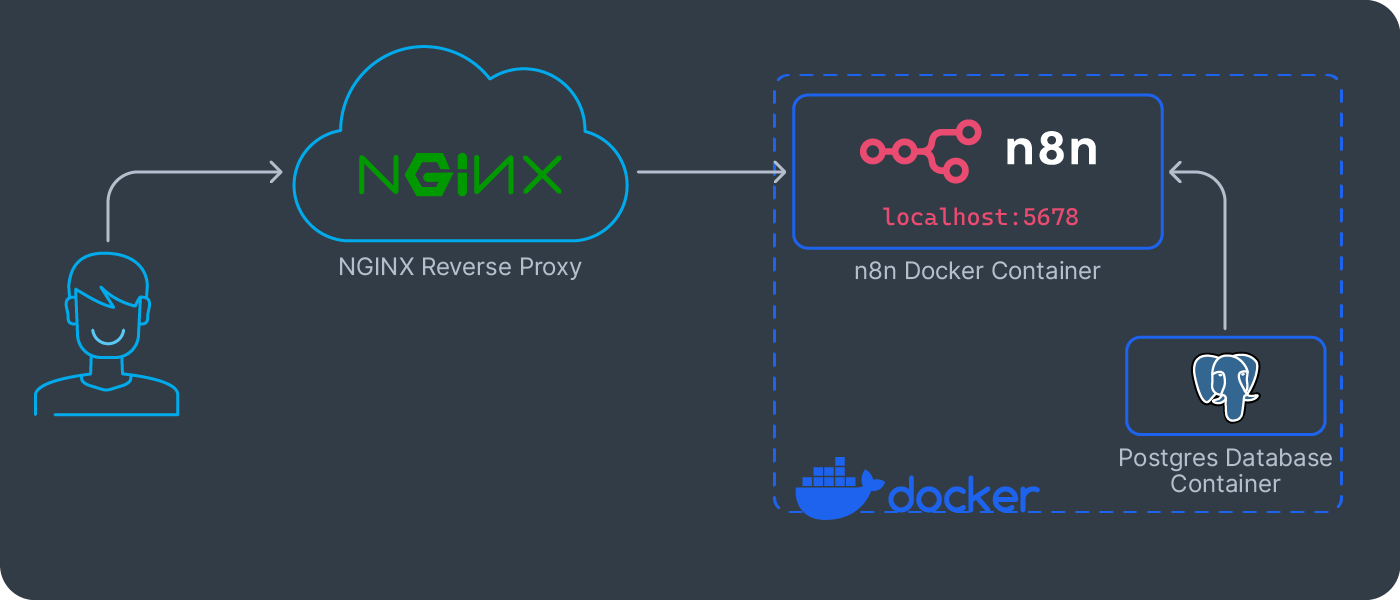
- Reverse proxy (Nginx or Traefik)
- PostgreSQL (preferable over SQLite for teams and scaling)
Overview of n8n Installation Methods
-
Cloud-hosted
Managed by n8n — rapid setup with less control over data.
-
npm
Handy for local development — requires Node.js experience.
-
Docker (Recommended)
Isolated, production-friendly, enables features like Git and SSO.
-
Source Code
For power users needing deep customization.
If you’re interested in AI, automation, and how intelligent agents drive business processes, see this overview.
Step-by-Step Guide: How to Install n8n Using Docker
Step 1: Install Docker & Docker Compose
Install the dependencies:
sudo apt update && sudo apt install docker.io docker-compose
Verify versions:
docker --version
docker compose version
Step 2: Create Project Directory & Environment
mkdir n8n-docker && cd n8n-docker
Then:
Create a .env file with basic settings:
N8N_HOST=yourdomain.com
N8N_PORT=5678
N8N_PROTOCOL=https
WEBHOOK_URL=https://yourdomain.com/
GENERIC_TIMEZONE=Your/Timezone
For more on collaborative automation, explore this multi agent systems guide.
Step 3: Basic Docker Setup
Quick test run:
docker run -it --rm \
  --name n8n \
  -p 5678:5678 \
  -v ~/.n8n:/home/node/.n8n \
  docker.n8n.io/n8nio/n8n
Browse to: http://localhost:5678
To automate more tasks with intelligent agents, see this resource.
FAQ
Is Docker the best way to host n8n for production?
Absolutely. Docker provides isolation, easier upgrades, backup control, and simple scaling for professional teams.
Can I use SQLite instead of PostgreSQL?
SQLite is fine for quick testing or solo users. Prefer PostgreSQL in production—it’s faster and handles multiple users and high workloads better.
Is n8n free for business use?
Yes. n8n is open-source and free for self-hosting, even for commercial use. Some enterprise features/licensing apply above a certain scale.
How do I upgrade my n8n Docker instance?
Simply run docker pull docker.n8n.io/n8nio/n8n then restart your container/compose stack with the latest image.
Where can I find templates and learn more about AI and automation in n8n?
Browse n8n’s workflow templates and dive into intelligent agent overviews for inspiration.