
n8n AI Automation: Unlocking Smarter Workflows with AI Agents
Estimated reading time: 7 minutes
Key Takeaways
- n8n AI automation enables end-to-end intelligent workflows with AI agents capable of decision making, memory, and tool usage.
- Its visual, node-based builder connects to 400+ services and leading AI providers (OpenAI, Hugging Face, Cohere).
- Self-hosting, Docker installation, and JavaScript support give advanced users flexibility and control.
- Businesses can automate summarization, sentiment analysis, ticket routing, and much more – with real-world use cases showing huge time savings.
- A supportive community and growing ecosystem make n8n a future-proof choice for automation with AI.
Table of Contents
What is n8n AI Automation?
*n8n AI automation integrates artificial intelligence directly into its visual workflow editor. Its name stands for “nodemation” (node + automation), reflecting its unique node-based approach to building powerful automations.*
Key features of n8n AI automation include:
- Drag-and-drop visual builder with 400+ nodes
- Native support for self-hosting and Docker deployment
- Flexible integration with AI providers like OpenAI, Hugging Face, Cohere
- Automated error handling and real-time monitoring
- Direct JavaScript and API integration for customization
This platform lets you blend the best of automation and artificial intelligence—turning repetitive, error-prone tasks into seamless, smart workflows. Read more about how n8n works.
Understanding AI Workflows in n8n
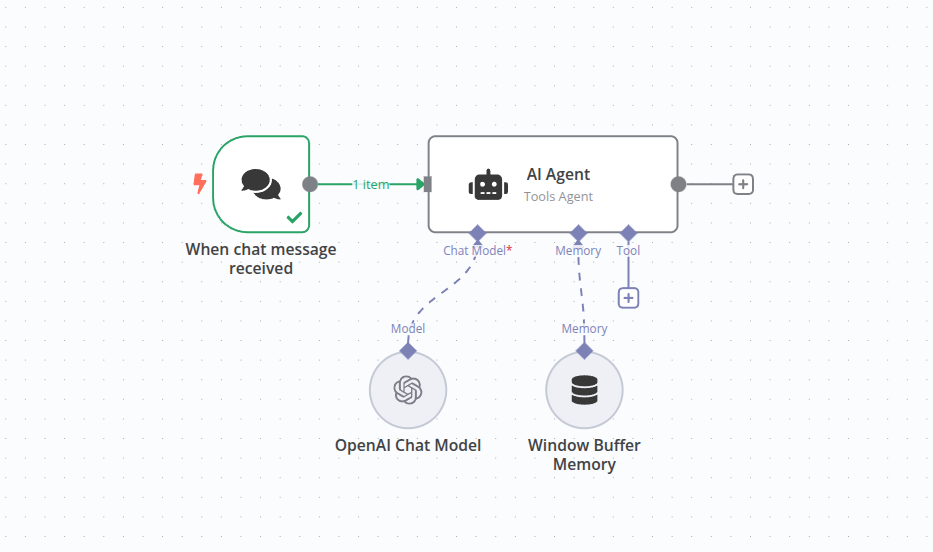
AI workflows in n8n are *chained, multi-step pipelines* that combine automation and intelligence into one visual canvas (see practical n8n workflow examples).
- Summarize incoming emails using AI
- Perform sentiment analysis at scale
- Route support tickets based on content
- Automatically transform or enrich data
These workflows leverage custom AI agents, native prompt chains, memory handling, and real-time decision making. Each node brings intelligence to your pipeline, eliminating manual work layer by layer.
Find out more about the best AI workflow automation patterns.
Introduction to AI Agents
AI agents are the autonomous workers inside n8n. Unlike traditional automation with static rules, these agents can:
- Make decisions in context (learn more about intelligent agents)
- Utilize tools and APIs dynamically
- Remember past actions and state
- Analyze, qualify, and route data in multi-step, adaptive processes
For instance, an AI agent can qualify leads, generate content, or analyze support tickets—all autonomously.
“n8n’s AI agents don’t just automate a task, they orchestrate entire business processes with the context and memory of a real coworker.”
Getting Started with n8n and AI
Ready to dive in? You can deploy n8n anywhere you like, with full control over data and costs. Visit the official Docker installation guide for n8n to get started in minutes.
- Install n8n on your own server or cloud instance
- Connect AI providers using built-in nodes
- Experiment with templates and workflow examples – see real-world AI automation use cases
*Tip:* The n8n community offers extensive documentation, templates, and active support to help you build your first intelligent workflow.
Real-World Use Cases
- Automated Email Summaries: AI reads and summarizes daily emails, posts the result to Slack.
- Customer Sentiment Analysis: All support tickets pass through an AI sentiment node, enabling personalized response pipelines.
- Lead Qualification: Use multiple data sources in a single workflow to prioritize and enrich leads, saving hours every week.
- Social Media Automation: AI agents generate, schedule, and auto-post branded content across channels.
- Data Cleaning and Enrichment: Streamline data pipelining directly in n8n, using AI to fill missing info or correct inconsistencies.
Curious about real success stories? Explore these real-world AI workflow examples that are saving businesses hundreds of hours each month.
FAQs
What makes n8n different from other automation platforms?
Unlike typical SaaS workflow tools, n8n supports self-hosting, advanced AI agents, and custom JavaScript logic—unlocking serious power for teams that want to own their data and customize every detail.
How do I connect n8n to OpenAI or Hugging Face?
Just add the OpenAI or Hugging Face node to your workflow, paste your API key, and n8n handles the connection securely.
Is there a cost to use n8n for AI workflows?
n8n is open-source and free for self-hosted deployments. Third-party AI providers (like OpenAI) may charge for API use, but you control the usage and spend.
Can I automate complex multi-step processes with n8n?
Absolutely. That’s where n8n shines—its AI agents and memory make it possible to automate layered processes that would overwhelm basic tools.